Setup guide
Connect StartOps to your AI assistant
Choose ChatGPT or Claude. StartOps adds private founder context and durable workspace memory while your conversations stay in the AI tool you already use.
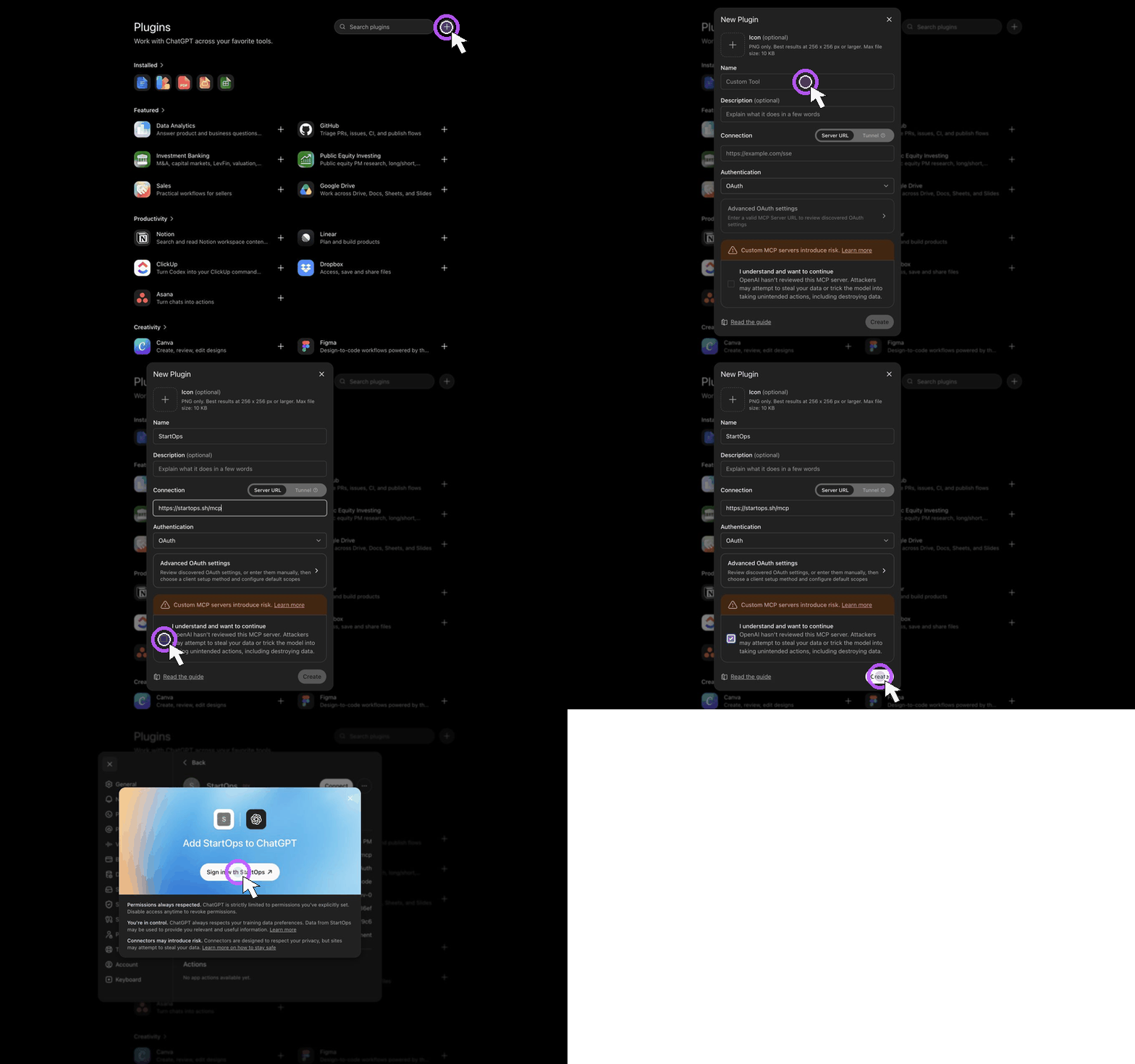
- Open Plugins from the ChatGPT sidebar.
- If StartOps is already listed and sign-in fails, delete that plugin first so ChatGPT registers a fresh OAuth client.
- Choose Create app, name it StartOps, and paste the StartOps MCP endpoint as the server URL.
- Select Create, then sign in to StartOps and choose the workspace you want to connect.
- In a new chat, select the StartOps plugin and paste your workspace starter prompt.
StartOps MCP endpoint
https://startops.sh/mcpChatGPT lists integrations under Plugins. Its first-time setup button currently says Create app because the plugin uses an underlying MCP connection. A plugin created before the current OAuth contract must be deleted and recreated; reconnecting the old client keeps the stale registration.